

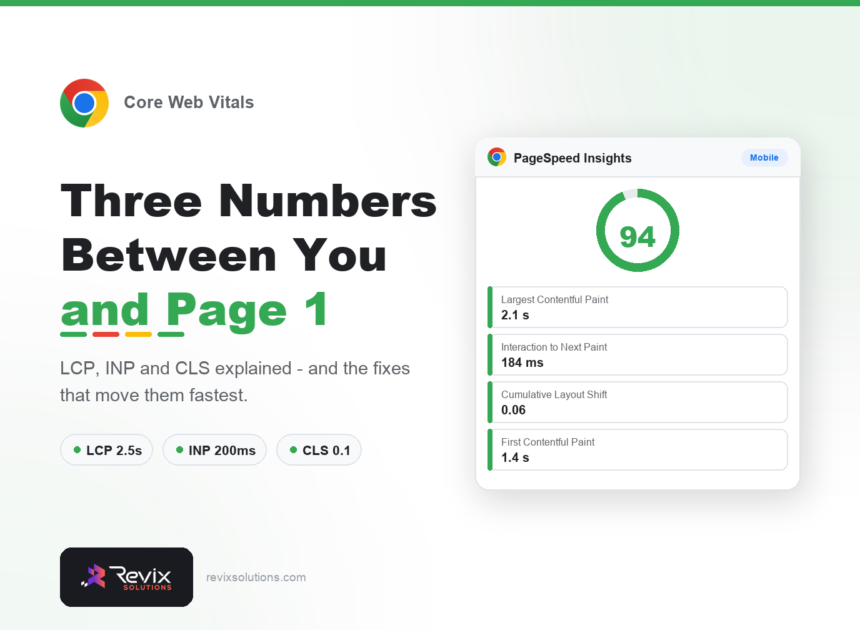
Core Web Vitals measure how a page feels to a real visitor — how quickly the main content appears, how fast it responds to a tap, and whether things jump around while loading. Passing them is worth doing, but for the right reason: the ranking effect is modest, while the conversion effect is substantial. This guide covers the current thresholds, what actually causes failures, and the fixes that move scores fastest. Sound Core Web Vitals work fixes images and scripts before anything else.
Core web vitals: the short answer
Aim for LCP under 2.5 seconds, INP under 200 milliseconds and CLS under 0.1, measured on real users rather than a lab test. The three fixes that resolve most failures are compressing and correctly sizing images, deferring scripts that block rendering, and setting explicit width and height on every image. Google judges you on field data from real Chrome users, not your Lighthouse score.
The three metrics
| Metric | Measures | Good | Needs work | Poor |
|---|---|---|---|---|
| LCP (Largest Contentful Paint) | When the main content appears | ≤ 2.5s | 2.5–4s | > 4s |
| INP (Interaction to Next Paint) | How fast the page responds to input | ≤ 200ms | 200–500ms | > 500ms |
| CLS (Cumulative Layout Shift) | How much the layout jumps | ≤ 0.1 | 0.1–0.25 | > 0.25 |
A note on INP
Interaction to Next Paint replaced First Input Delay in 2024. The difference matters: FID only measured the first interaction and was easy to pass, while INP measures every interaction and exposes pages that feel sluggish after load. Many sites that comfortably passed FID now fail INP.
What actually causes failures
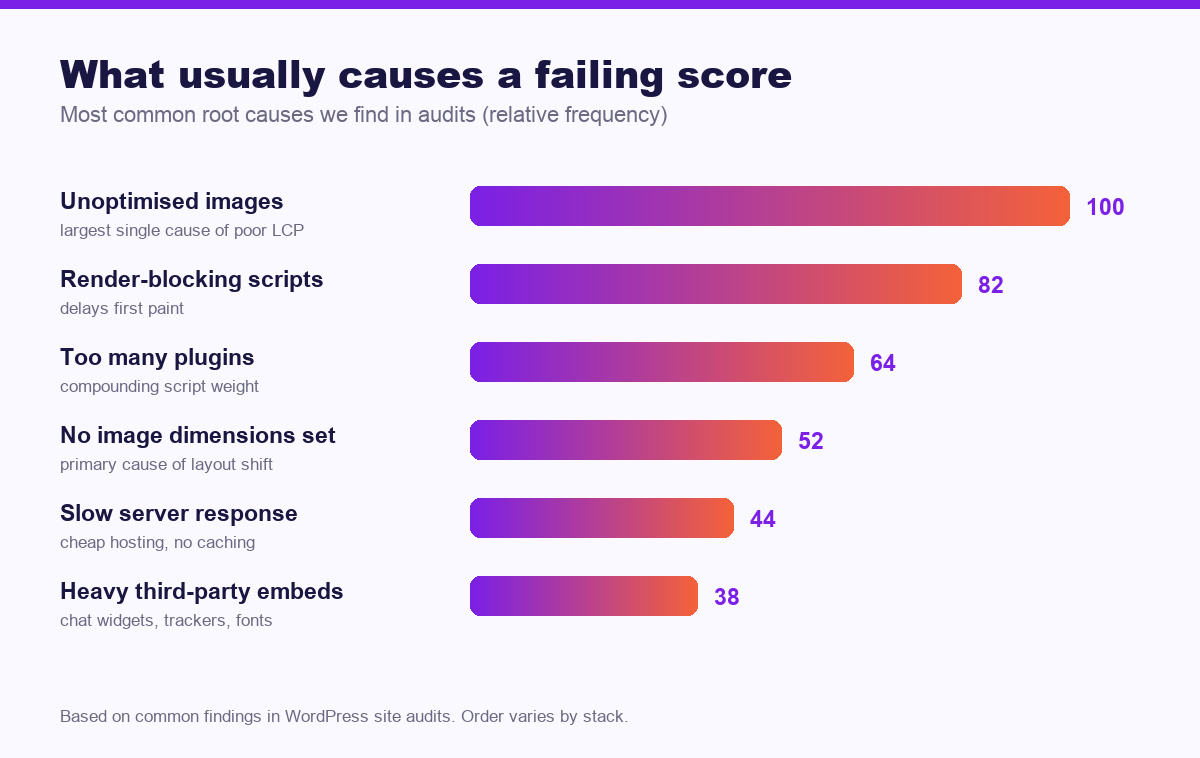
Images are the usual culprit
A hero image exported at 4000 pixels wide and served to a phone will fail LCP on its own. Serve appropriately sized images, use modern formats such as WebP, and compress properly. This single fix resolves more failing scores than everything else combined.
Render-blocking scripts
Scripts loaded in the head block the browser from painting anything. Defer everything that is not needed for the initial view — analytics, chat widgets and social embeds almost never need to load first.
Missing image dimensions
If an image has no declared width and height, the browser cannot reserve space, so content jumps when it loads. Setting explicit dimensions on every image is the fastest CLS fix available.
Plugin and theme weight
On WordPress specifically, each plugin adds scripts and stylesheets that load on every page. Auditing what is actually needed frequently produces a bigger improvement than any caching configuration.
The fix list, in order of impact
- Compress and resize images, convert to WebP, and lazy-load anything below the fold — but never lazy-load your LCP image.
- Defer non-critical JavaScript and remove scripts you no longer use.
- Set width and height on every image and embed.
- Enable caching and a CDN. On cheap shared hosting this is often the difference between passing and failing.
- Preload the LCP image and critical fonts, and self-host fonts where possible.
- Reserve space for ads, banners and embeds so they cannot push content down.
- Audit plugins. Remove anything unused, and look hard at page builders and sliders.
Lab data, field data, and which one counts
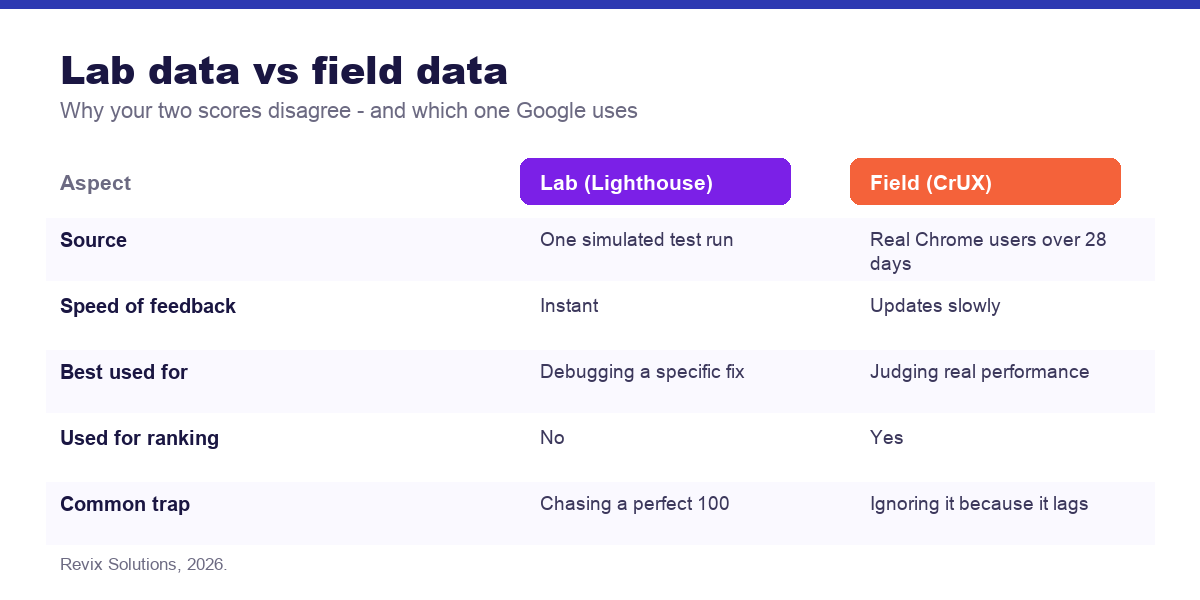
Lighthouse gives you an instant score from a single simulated test. Search Console reports field data collected from real Chrome users over 28 days. Google uses the field data, which is why a site can score 95 in Lighthouse and still show a failing Core Web Vitals report.
The practical implication: make a fix, verify it in Lighthouse immediately, then wait several weeks for the field data to reflect it. Do not keep changing things while waiting.
An honest word on expectations
Core Web Vitals are a real but small ranking factor. If your content does not match what people search for, a perfect score will not rank you. Conversely, a site with genuinely useful content ranks well with mediocre scores every day.
Where speed pays reliably is conversion. Mobile visitors on variable connections abandon slow pages before they see your offer, and page speed also feeds Google Ads Quality Score, which lowers your cost per click. Those are better reasons to invest than the ranking effect.
Frequently asked questions
What are Core Web Vitals?
In practice, core web vitals follows the same rules for most businesses. Core Web Vitals are three Google metrics measuring loading speed (LCP), responsiveness (INP) and visual stability (CLS). They form part of Google’s page experience signals and are measured from real Chrome user data.
Do Core Web Vitals affect rankings?
They are a genuine but modest ranking factor. Relevance and content quality matter far more. Their bigger commercial effect is on conversion, since slow pages lose visitors before they convert.
What is a good LCP score?
Largest Contentful Paint should be 2.5 seconds or less for 75 percent of visits. Between 2.5 and 4 seconds needs improvement, and above 4 seconds is poor.
What replaced First Input Delay?
Interaction to Next Paint replaced FID in March 2024. INP measures responsiveness across all interactions rather than only the first, and a good score is 200 milliseconds or less.
How do I test Core Web Vitals?
Use PageSpeed Insights for both lab and field data, Search Console’s Core Web Vitals report for site-wide trends, and Chrome DevTools Lighthouse for debugging individual pages.
Why does my score differ between tools?
Lighthouse runs a simulated lab test on one device, while Search Console reports real user data across many devices and networks. Field data from real users is the version Google actually uses.
If you would rather have core web vitals handled for you, our website optimisation and website development cover exactly the work described above.
Core web vitals: what to do next
The short version of this guide: core web vitals rewards sequence over effort. Fix the foundations first, publish what your customers actually search for, then measure enquiries rather than rankings. Businesses that treat core web vitals as a system rather than a checklist are the ones still compounding a year later.
Failing Core Web Vitals and not sure why?
We will run a full performance audit on your key pages, identify the specific causes of each failing metric, and give you a prioritised fix list ranked by expected impact.
Plans start from Rs 16,000 per month. See current pricing.
Related reading: landing page conversion rate optimization, website design cost in India.